Posts

Collection Interface

Collection Interface –     Collection Interface has arranged on top of the Collection Framework because any class within the Collection Framework must be implement.     Collection Interface also extends Iterable Interface so that any class can have use for-each loop for iterating the objects from Collection Interface.     Declaration of Collection Interface is :     interface Collection<E>         E denotes the data type of the objects which will store with in the Collection Interface Now we are providing the Methods List with description which is framed in Collection Interface. boolean add(Object obj) – This method is used for add news object in the Collection. This method returns false if Collection has this object already otherwise this method add the objects and return true. boolean addAll(Collection c) –     This method adds all the object of Collection c and return true,...
Collections Framework

Image
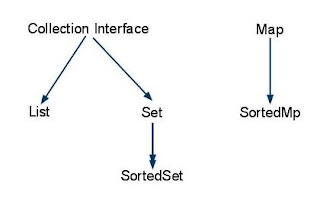
Collections Framework –                  Within the java.util package, there is a hierarchy of some interfaces classes enclosed within the framework for managing manipulating and accessing the groups of objects.                  There is a figure :                  Collections Framework was not present before J2SE 1.2. Collections Framework was added within this J2SE 1.2. Collections Framework is designed for solve the situations which many developer face in data manipulating.                  Java Collections Framework is similar to the Standard Template Library (STL) of C++.                 ...

About Blog

       This blog is designed for knowing more about the Collections Framework of java. Collections framework is heart of java. So this blog gives you a very deep knowledge about Collections Framework . For a java developer, this blog will try to provide good understanding about the Collections Framework . Through this blog, you can learn to managing groups of objects and searching data according to situations of program. You will learn how to use For-Each Loop for iterating the value from collection.

JSP Components Declaratives Scriptlets Expressions

JSP Components -     JSP has mainly six type of components. 1. JSP Declaratives 2.JSP Scriptlets 3.JSP Expressions 4.Directives  5.Implicit Objects 6.Standard Actions  JSP Declaratives -        JSP Declaratives is used for embed Java code in class label. Any code which is written in JSP Declaratives will goes to scope of a class of servlet. JSP Declaratives is open with <%! and closed with %> syntax. If any variable is made in JSP Declaratives means this variable will be available for any where with in JSP. Example -     <HTML>          <HEAD>          <BODY>         <%!             public int getSum(int a, int b){                 return a+b;      ...

Java Server Page Life Cycle

JSP (Java Server Page) -     JSP means java server page with in the JSP you can write java code with in html code.     Ex -     <html>         <body>         <%             System.out.println(“This is my first JSP Page”);         %>         </body>     </html>     When any request will go for any jsp firstly JSP creates a Servlet for JSP and compiles to .class file then run over the web server. JSP Life Cycle -     There are three methods defines Life Cycle of JSP Page. 1._jspInit() 2._jspService() 3._jspDestroy() _jspInit() Method - _jspInit() method is called by jsp container for initializing the servlet of jsp page. This method is call at one time of any JSP life. _jspService() Met...

Statement Prepared Statement Callable Statement

Statement, Prepared Statement, Callable Statement - Statement –  Statement is the java interfaces under java.sql package. This object is used for executing the SQL Query with the execute methods.     There the three manner to execute the queries. 1)execute() - execute method are used for execute DML queries. 2)executeBatch() - This method is used for executing many queries at a time. For using this method first add the queries in addBatch() method. 3)executeQuery() - This method is used for select the data from database. This method return ResultSet of database. 4)executeUpdate() - This method is used for update records with in the database. Prepared Statement –     Prepared Statement is used for executing the queries with parameter. Any query is compiled and stored in PreparedStatement object at first time.      PreparedStatement is used for a situation where you want to execute one query with in a loop.  ...

Steps Making JDBC connection

Steps for Making JDBC connection -     There are six steps for making the JDBC connection. 1) Load the driver -     Ex -     Class.forName(“sun.jdbc.odbc.JdbcOdbcDriver”);     conn = DriverManager.getConnection(“<<DSNName>>”,<< username>>, <<password>>);    It can gives the ClassNotFoundException, SQLException exceptions so use try catch block for this code.  Try {     Class.forName(“sun.jdbc.odbc.JdbcOdbcDriver”);     }catch (ClassNotFoundException e) {                 // Could not find the database driver             } catch (SQLException e) {                 // Could not connect to the database         ...

Recent Post

Recent Posts Widget