Posts

Showing posts with the label Java

java questions

    *      What is the use of bin and lib in JDK?- Bin contains all tools such as javac, appletviewer, awt tool, etc., whereas lib contains API and all packages.     *      What is casting?- Casting is used to convert the value of one type to another.     *      What is final, finalize() and finally?- final : final keyword can be used for class, method and variables. A final class cannot be subclassed and it prevents other programmers from subclassing a secure class to invoke insecure methods. A final method can’t be overridden. A final variable can’t change from its initialized value. finalize() : finalize() method is used just before an object is destroyed and can be called just prior to garbage collection. finally : finally, a key word used in exception handling, creates a block of code that will be executed after a try/catch block has completed and before the c...

Array concept

Image
Array in Java  - Array is a container where we can put the objects or values of same data type. Size of this container will be predefined and fixed length. It means when you will make the object of array then defines the length of array. Now I am trying to explain in image. In this figure, there is a array container with fixed 10 length. There is a value stored at 3 index in this array container. In the java context, We are writing a java program to know how value stored in java programming. java in array Example : public class ArrayExample{   public static void main(String[] args) {       // this is a array container of int data type.       int []array = null;       // Now fixed the length of this array container       array = new int[10];       //Now i have put the value in array at 3rd index.     ...

autoboxing and unboxing in java

autoboxing and unboxing in java – autoboxing and unboxing concepts is related to primitive data types and its wrapper classes. If any wrapper class holds the value of its primitive data type called boxing. And if any primitive data type holds the objects of its wrapper class called unboxing. autoboxing and unboxing in java is two types : 1) Implicit Auto boxing. 2) Explicit boxing. 3) Implicit unboxing. 4) Explicit unboxing. Implicit Auto boxing – J2SE 5 was added autoboxing. Autoboxing is internal process where primitive data type automatically encapsulated within their wrapper classes. So there is no need to wrap primitive data type to its wrapper classes. There is really very helpful with in collection framework. Because collections framework allows objects instead of primitive data type. Example :- Integer intObj = 786; // Autoboxing List listObj = new ArrayList(); listObj.add(786); // Autoboxing listObj.add(787); // Autoboxing So in this line there i...

Equals and = = operator

Image
Equals and = = operator - = = is a operator , which is used for check the equality of two values. if two values are equal then it will return true otherwise return false. equals() is a method of object class, which is used for check the equality of two objects. if two objects are equal then it will return true otherwise return false.      public class Test { public static void main(String[] args) { int int1  = 10; int int2  = 10; Integer one = new Integer(int1); Integer two = new Integer(int2);        //compare for two objects if(one.equals(two)){ System.out.println("two objects are equals"); } // compare two values if(int1 == int2){ System.out.println("Two values are equals"); } } } output : two objects are equals Two values are equals Deep Knowledge about this - in the above figure, I am trying to make a sense about the example -  when we make first int variable int int1=10; value 10...

Set Interface

Java collections framework: Set Interface : "Set is very important when you want to collect unique elements. Set is follows the mathematical fundamental of Set. Set Interface can contains one null value also. But some implementation classes are not allowed the null value...." Read More Articles    click on this link.

Statement Prepared Statement Callable Statement

Statement, Prepared Statement, Callable Statement - Statement –  Statement is the java interfaces under java.sql package. This object is used for executing the SQL Query with the execute methods.     There the three manner to execute the queries. 1)execute() - execute method are used for execute DML queries. 2)executeBatch() - This method is used for executing many queries at a time. For using this method first add the queries in addBatch() method. 3)executeQuery() - This method is used for select the data from database. This method return ResultSet of database. 4)executeUpdate() - This method is used for update records with in the database. Prepared Statement –     Prepared Statement is used for executing the queries with parameter. Any query is compiled and stored in PreparedStatement object at first time.      PreparedStatement is used for a situation where you want to execute one query with in a loop.  ...

Steps Making JDBC connection

Steps for Making JDBC connection -     There are six steps for making the JDBC connection. 1) Load the driver -     Ex -     Class.forName(“sun.jdbc.odbc.JdbcOdbcDriver”);     conn = DriverManager.getConnection(“<<DSNName>>”,<< username>>, <<password>>);    It can gives the ClassNotFoundException, SQLException exceptions so use try catch block for this code.  Try {     Class.forName(“sun.jdbc.odbc.JdbcOdbcDriver”);     }catch (ClassNotFoundException e) {                 // Could not find the database driver             } catch (SQLException e) {                 // Could not connect to the database         ...

JDBC Driver Types

JDBC Driver Types -     Java has four type of JDBC driver for accessing and managing the relational databases. 1.JDBC-ODBC Bridge Driver – Type 1 2.JDBC-Native API - Type 2 3.JDBC-Net-protocol driver - Type 3 4.pure Java - Type 4  JDBC ODBC Bridge Driver (Type 1) -     JDBC ODBC Bridge Driver is fully platform dependent. This driver is used for learning phase of java. For making the JDBC ODBC connection, there is need to make DSN with the database in microsoft windows. This driver makes a bridge over the java application to DSN  and DSN point to the database. JDBC-Native API / partly Java driver (Type 2) - This driver used the Native api of other language like c/c++ for making connection with database. This driver is partly written java and C (C++) language. This is vender specific driver, we need to install software for making connection through this driver. The Oracle Call Interface (OCI) driver is an example JDBC-Net-protocol dr...

about JDBC

JDBC -     JDBC terms used for java database connectivity. Java has java.sql package which support  java database connectivity (jdbc). This api provides the facility to manage database through java code.     With in the java.sql package, Java API has seven classes .     1.Date 2.DriverManager 3.DriverPropertyInfo 4.SQLPermission 5.Time 6.Timestamp 7.Types     and have 22 interfaces 1.Array 2.Blob 3.CallableStatement 4.Clob 5.Connection 6.DatabaseMetaData 7.Driver 8.NClob 9.ParameterMetaData 10.PreparedStatement 11.Ref 12.ResultSet 13.ResultSetMetaData 14.RowId 15.Savepoint 16.SQLData 17.SQLInput 18.SQLOutput 19.SQLXML 20.Statement 21.Struct 22.Wrapper and have 17 exceptions. 1.BatchUpdateException 2.DataTruncation 3.SQLClientInfoException 4.SQLDataException 5.SQLException 6.SQLFeatureNotSupportedException 7.SQLIntegrityConstraintViolationException 8.SQLInvalidAuthorizationSpec...

Fibonacci Series using Recursion

Fibonacci Series using Recursion Fibonacci Series - Fibonacci Series is the addition of before two digits, You can achieve Fibonacci Series using Recursion and with out making any global variable through this program. public class Test {         public static void main(String[] args) {         Test test = new Test();         test.getFibonacciSeries(0,1, false);     }         void getFibonacciSeries(int x, int y, boolean s){         if(x == 0)             System.out.println(x);         if(y == 1 && !s){             System.out.println(y);             s=true;         }         Sy...

daemon thread

What is a daemon thread            Daemon threads are sometimes called "service" threads. These are threads that normally run at a low priority and provide a basic service to a program or programs when activity on a machine is reduced.           An example of a daemon thread that is continuously running is the garbage collector thread. This thread is provided by the JVM.

difference between yield and sleeping

What is the difference between yield and sleeping When a task invokes yield(), it changes from running state to runnable state. When a task invokes sleep(), it changes from running state to waiting/sleeping state.

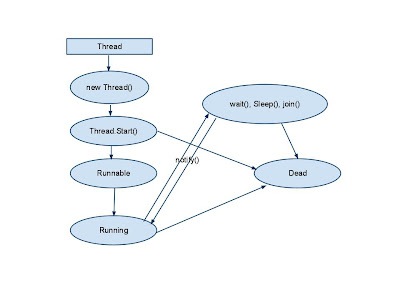
Thread Life Cycle in java

Image
Thread Life Cycle -      In the following figure, we are describing about Thread Life Cycle. 1) Create Thread – Thread can be create through Thread Class or Runnable interface. 2) New State – when any object of thread is being made by new Thread() 3) Runnable – When start method of thread is called means thread is now in runnable state. 4) Running – After Runnable state, based on the priorities of thread, is being to running state. 5) Dead – After running state, thread will go to Dead. Or it can be block states. 6) Block States – Thread can be in block state by calling wait(), sleep(), join() methods. 7) Sleep State – when sleep() method is called by thread, thread will go to the sleep state. Sleep State means, This thread is still alive and it can be go on runnable state. Thread has sleep method for passing the time in millisecond. And throw InterruptedException.     static void sleep(long millisecond) throws Int...

Creating a Java Thread example

Creating A Thread - There are two ways to create threads. 1)extends Thread Class 2)implements Runnable Interface. Example – Through the Thread Class public class Test extends Thread{     private String msg;         Test(String msg){         this.msg=msg;     }     public void run() {         for(int x=0; x<5; x++){             System.out.println("-----"+msg);         }     }     public static void main(String[] args){         Thread thread1 = new Test("first Thread");         Thread thread2 = new Test("Second Thread");         thread1.start();         thread2.start();     } }  Example...

about Process And Thread java

Process And Thread When program runs under the concurrency environment, Then Thread will be in lead roles. Environment which manages some threads called process. Threads – Thread are light weight piece of code which runs under the concurrent environment. Many threads can run concurrently and share the same heap memory but every thread has its own stack allocation area. Threads can run under the process. Process – Process is an execution of program and has its own memory allocation areas. A JVM runs in a single process and threads runs under the JVM and share a single heap memory allocation area. Threads exist within a process — every process has at least one. Threads share the process's resources, including memory and open files. This makes for efficient, but potentially problematic, communication.

about user defined exception in Java

User defined exceptions may be implemented by defining a new exception class by extending the Exception class. public class MyException extends Exception { /* class definition of constructors goes here */ public MyException() { super(); } public MyException (String errorMessage) { super (errorMessage); } } Throw and/or throws statement is used to signal the occurrence of an exception. Throw an exception: throw new MyException(“I threw my own exception.”) To declare an exception: public myMethod() throws MyException {…}

about Exceptions in Java

Exceptions in Java -     An Exception is phenomenal condition, which can comes your program when program is executed. And this condition interrupt with program's normal flow.     When any program face the exceptional condition, an exception object is made by JVM and program will be terminate.             For prevent the termination of program, There is need to handle this situation.     There are three type of exceptional event occurs.     1)Error 2)Checked Exceptions 3)Unchecked Exceptions Errors - Error can be occurs for network failure, Hardware failure or any other reason besides your programs. So you can not handle this through program code. Checked Exceptions -     Java compiler checks your code at compile time. If any exception occurs in this time error handler read this at compile time. This is called checked exceptions.   ...

about Java Garbage Collector

Java Garbage Collector -       Garbage Collector in Java working for release the memory form waste (unreachable) object. Garbage Collector works with heap memory.               Any Object is created in Java it goes to the heap memory. When this object is being waste or unreachable then Garbage Collector release memory from its. Understand about  waste or unreachable object -         String s  = new String(“Albert”);     String s1 = new String (“Another”);     s1=s ;            in this case new String (“Another”); has been waste object. Then  Garbage collector will release the memory form this object.      Garbage Collector called by JVM directly. You can not force for release the memory. You can request to Garbage Collector through System.gc()...

Outer Inner and Anonymous Classes java

Outer and Inner Class in Java     In Java, Class which is written inside the class called Inner Class. Class which has the inner class called outer class.     There are four types of Inner Class in java.     1)Static nested class 2)Member Class 3)Local Class 4)Anonymous Class     Static nester class -     Any class written inside the class with static keyword called  Static nester class.     Example -     public class Test{             /* Static nested class*/         static class InnerClass{                 }     }         There is  InnerClass is  Static Nested Class.     Member Class -     Any class written inside the class without the...

about Heap and Stack Memory in Java

Stack  Memory Allocation and Heap Memory Allocation In Java Virtual Machine, There are two type of memory allocation process. 1)Stack  Memory Allocation 2)Heap Memory Allocation Stack  Memory Allocation -            When ever any class will be written in java, this files content will goes in the  Stack  Memory Allocation area.     Example:-            class TestA{         int x=10;         int y=20             public int add(int x, int y){         return x+y;            }     }     The class A will be stored in Stack  Memory Allocation area. Heap Memory Allocation -     When ever object of any clas...

Recent Post

Recent Posts Widget